The best humidity monitor is the one you can place sensibly, read easily, and use to answer a real question about your home. For a simple display, start with the TP50; for nearby phone history, consider the Govee H5075; for an AA-battery display with range records, compare the AcuRite 00613.
You do not need to buy a dehumidifier or humidifier before you know what your room is doing. A small monitor gives you a starting record, although its number alone cannot tell you why a wall is damp or whether a room needs new equipment.
Choose the question before the screen
Write down the decision you hope to make: whether a bedroom feels different overnight, whether a basement reading changes after rain, or whether a humidifier setting is doing more than you intended. That question tells you whether a visible number is enough or whether you will actually use a history graph.
A display that you notice every morning may suit your routine better than an app you never open. If another person will also check the room, choose a location and a reading method both of you can use without handing over a phone.

Best for a straightforward readout: TempPro TP50

The linked Amazon listing identifies the TP50 as TempPro, and the former ThermoPro product address now redirects to TempPro. Match the TP50 model and single-unit listing rather than assuming every similarly named monitor or multipack has the same package.
TempPro documents one AAA battery and a humidity tolerance of ±2 percentage points from 30% to 80% RH and ±3 points outside that band. The page also describes ten-second updates and tabletop, magnetic, and hanging placement options.
This is your best starting point here if you want to glance at a shelf and make your own short notes. Keep a small notebook beside it rather than buying more connectivity solely because a shopping page makes a basic screen look old-fashioned.
The published specification table says no backlight, but other page copy is inconsistent about that feature. If nighttime readability matters, confirm the exact single-unit version before ordering; this shortlist does not treat illumination as a verified benefit.
Best for nearby phone history: Govee H5075

Govee identifies this model as Bluetooth-only, with no Wi-Fi connection, and documents CSV export through its app. The manufacturer also specifies two AAA batteries and a display with a stand and rear hanging hole.
Choose it if you expect to look back at changes instead of remembering one number from yesterday. For example, you can compare your own notes about showers, cooking, or an open window with the timing of a change, without treating the coincidence as proof of a cause.
Do not buy this particular model expecting a standalone internet connection for a second home. Decide where your phone will normally be when you read or synchronize it, and check the current app requirements before assuming every member of your household can use the same arrangement.
Bluetooth range in your house is not a promise based on an open-air distance claim. If history is essential, make checking that connection part of your initial setup while you can still evaluate whether the purchase fits your intended room.
Best for an AA-battery display with range records: AcuRite 00613

AcuRite documents current temperature and humidity, daily high-and-low records, and a humidity-level icon for the 00613 family. Its product page lists a magnetic back, wall-mounting keyhole, upright placement, and one AA alkaline battery that is not included.
The TP50 also offers high-and-low records, so that feature is not unique to the AcuRite.
AcuRite’s manual describes a rolling 24–36-hour record window rather than a midnight-reset calendar day.
This option makes sense if you want a brief daily range but do not want a phone involved. Check the current package and model on the retailer page, especially when a listing combines several AcuRite shapes or accessory bundles.
A high or low record gives you a reason to pay attention, but it does not tell you exactly when the change happened. If timing is the missing part of your question, a handwritten morning-and-evening log or the Govee history approach may be more useful.
Give your monitor a fair place to work
AcuRite’s instructions recommend a dry spot out of direct sunlight, away from heat sources or vents, and away from humidity sources. Apply that placement guidance before judging two readings taken in different locations.
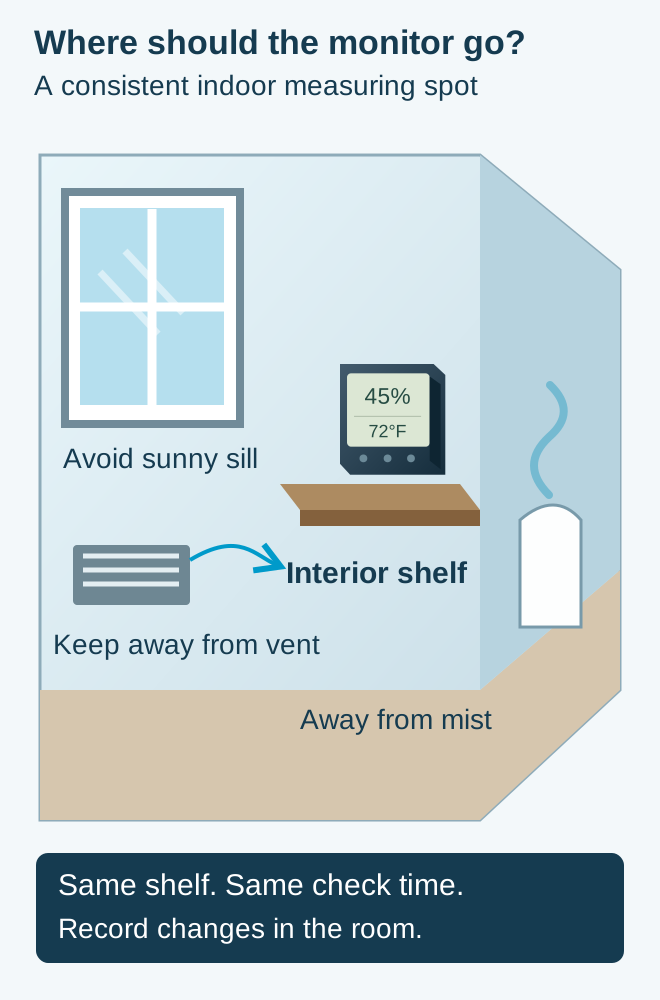
Pick a shelf you can leave alone for a few days, then record the location as carefully as the reading. Moving the monitor from a sunny sill to a shaded bookcase creates a different observation, so mark the move rather than joining both sets of numbers as though nothing changed.
If you own two monitors, place them together before sending them to separate rooms. You are checking whether they broadly agree in the same setting, not performing a calibration or proving either unit meets a laboratory standard.
A few percentage points of difference should send you back to the published tolerances and placement notes before you buy a third device. Keep your decision focused on a persistent pattern, not a contest to find the display showing your preferred number.
Use the reading as a prompt, not a diagnosis
Try a three-day question rather than an open-ended collection exercise: what does this room show before breakfast, after you return home, and before bed? Put the readings beside a brief note about anything unusual, then decide whether you have enough information to ask a more precise question.
If you miss a reading, leave a gap in your notebook instead of filling it from memory. A small honest record is more useful than an apparently complete schedule whose numbers you cannot explain when you finally speak with someone about the room.
For a shared household, agree on what happens after a surprising result before the surprise occurs. You might take another reading in the same location, check whether the monitor was moved, and document a visible moisture problem rather than having two people change appliance settings independently.
Think about replacement batteries and the place you will keep the instructions, too. A monitor that stops being checked after its first battery runs down has not failed your room; the routine simply needs to be easy enough that you will keep using it.
If you move a unit to a second room, label the new location and begin a separate line of notes. Comparing two rooms can be helpful, but a record called “upstairs” quickly becomes confusing when you no longer remember whether the monitor was beside the bed or on the landing.
You can also stop collecting data once it has served its purpose. If a visible display and a few notes answer your buying question, there is no need to turn an ordinary comfort check into a permanent home-monitoring project with more accounts and more equipment.
EPA’s mold course recommends keeping indoor relative humidity below 60%, ideally 30%–50% when possible, and explains that moisture can also come from leaks and condensation. A humidity monitor measures room conditions; it does not identify hidden mold or certify a building as dry.
If a window stays wet, photograph the visible condition and note when you first see it alongside your readings. Share that record with your landlord or a qualified building professional instead of assuming a different monitor will explain the whole problem.
None of these three is the right tool when you require a remotely managed alarm system, a documented calibration service, or dependable warning of water on the floor. Write those requirements down separately so you do not mistake a useful room display for a complete protection system.
For an ordinary room, choose the simplest option that answers your original question, keep the placement consistent, and review the notes before buying another appliance. Your useful result is a clearer decision about your home, not the largest collection of environmental numbers.
Sources and selection notes
- Amazon TP50 single-unit listing · Exact model or guidance checked October 16, 2026.
- TempPro TP50 manufacturer specifications · Exact model or guidance checked October 16, 2026.
- Govee H5075 manufacturer page · Exact model or guidance checked October 16, 2026.
- AcuRite 00613 manufacturer page · Exact model or guidance checked October 16, 2026.
- AcuRite 00215 / 00477 / 00613 instructions · Exact model or guidance checked October 16, 2026.
- EPA mold course, chapter 2 · Exact model or guidance checked October 16, 2026.
- Amazon listing: Govee H5075 · Exact model or guidance checked October 16, 2026.
- Amazon listing: AcuRite 00613 · Exact model or guidance checked October 16, 2026.
Recommendations reflect documented features and conditional fit, not hands-on tests. Retailer offers and selected variants can change; no fixed prices, ratings or stock guarantees are quoted.